
Less follow-up work. More time for inspecting.
PSA Verify organizes customer inventories and supports the documentation of inspections of X-ray protective clothing to DIN 6857‑2.
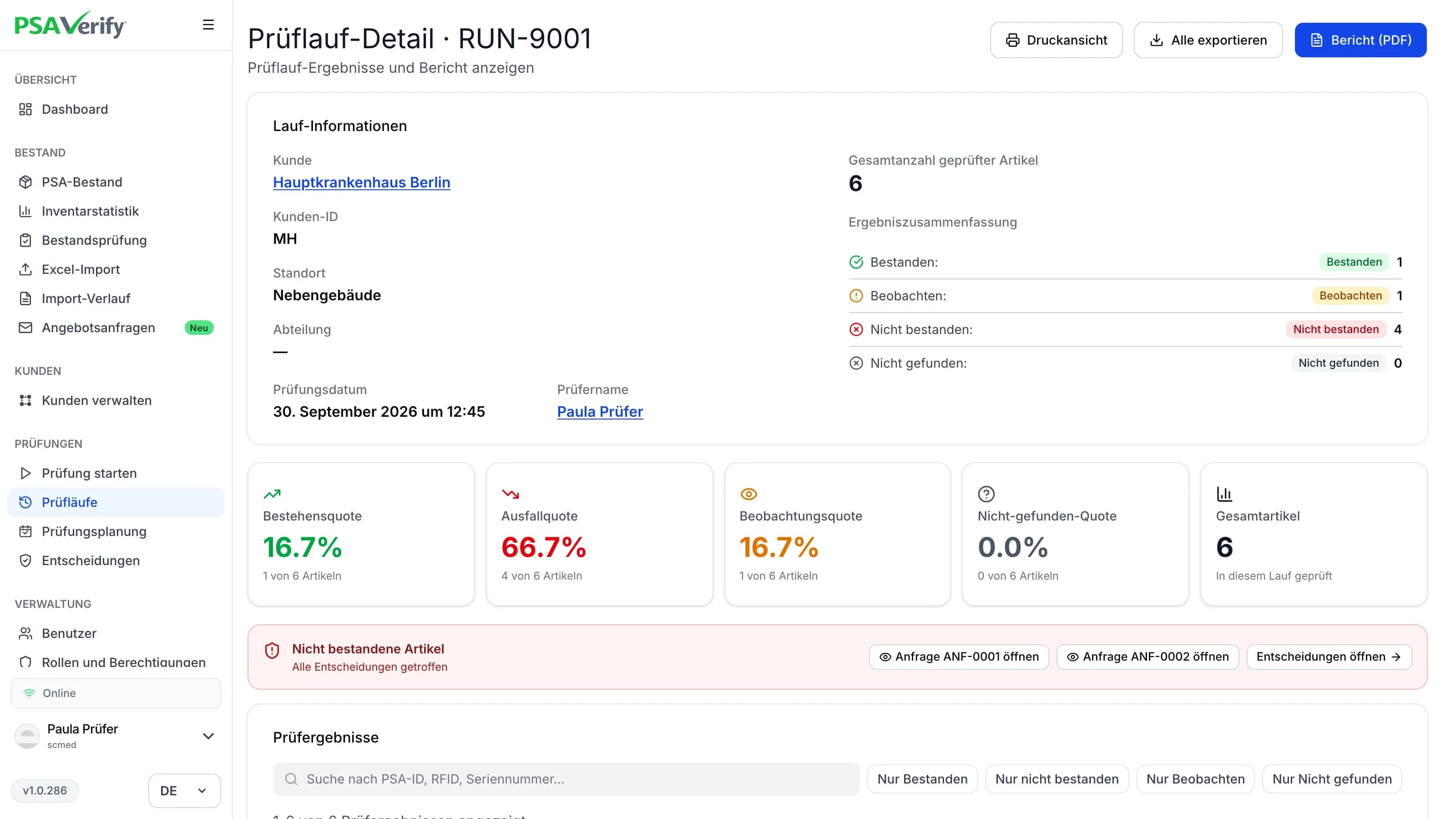
Results, comments and photos are recorded directly on the item during the inspection. Afterwards, PDF inspection reports and Excel exports are ready; there is no need to merge separately kept lists and image files later. Due inspections and previous results stay in view for upcoming appointments. Customers can access the information released to them through read-only access.
Your benefits
What PSA Verify does for inspection service providers.
Manage customer inventories in a structured way
Organize items by customer, site and department. Record different manufacturers together.
Reduce administrative follow-up
Document results, defects, comments and photos directly on the item. Once the inspection run is complete, the information is assigned and PDF inspection reports and Excel exports are available. There is no separate transfer or sorting of documentation.
Prepare upcoming appointments
See your customers' due inspections in one place and start scheduling early.
Reuse existing data for follow-up inspections
Reuse master data, assignments and previous results. Add new items and keep changes to the inventory up to date.
Give customers access
Provide released inventory data, inspection results and histories through read-only access. Customers can look up information themselves instead of asking again.
Hand over replacement needs transparently
Combine documented defects and photos with the item's model, size and assignment. The customer receives specific details for further decisions.
The key benefit
Documentation is created during the inspection. The structured customer inventory stays available for queries and follow-up inspections.
Note: Carrying out and assessing the inspection is the responsibility of the inspector. PSA Verify supports organization and documentation.
Questions from everyday practice
Can I use PSA Verify if an external service provider carries out our inspections?
Yes. You can give an external inspector access with the required inspection permissions. They document the inspection directly in your inventory: results, comments and photos stay centrally with your items.
Does the entire inventory have to be inspected on one day?
No. You can work through the inventory over several inspection dates, for example department by department. PSA Verify keeps the documented results and inspection status traceable in one place.
Which inspection reports and data exports are available?
After completing an inspection run, you can create PDF inspection reports and export inspection data as an Excel file. Results, documented defects and photos also remain traceable on the item.
How can inspection service providers manage multiple customer inventories?
Inspection service providers can manage customer inventories with their sites and departments in a structured way. Item data, inspection dates and results stay assigned to the respective customer inventory.
Can customers of an inspection service provider view their results themselves?
Yes. With read-only access set up for them, customers can access their released inventory data, inspection results and reports, even after the inspection date.
How does PSA Verify remind you when exams are due?
PSA Verify displays pending and overdue checks directly in the platform and dashboard. In addition, the responsible people receive automatic email reminders. Using a multi-level escalation system, those responsible in the department and then the responsible people at the location and facility level can be informed first. This means you can keep an eye on test dates and necessary measures.
What is the difference between inventory and audit?
With Inventory you manage your PPE inventory, assign items to locations, departments or people and keep an eye on their history. Audit also includes the functions for carrying out and documenting your own tests - including assessment, photo documentation and test reports.
Is PSA Verify manufacturer-independent?
Yes. You can manage radiation protection PPE from different manufacturers together in PSA Verify. This gives you a central overview of your entire inventory - even for different makes and models.
How do we get started and what support do we receive?
We support you in setting up PSA Verify and transferring existing inventory data. The setup also includes training so that the responsible employees can work with the functions that are relevant to them. The scope is tailored to your facility and your initial data.
Can different test intervals be stored?
Yes. Test intervals can be stored individually for locations and departments and, if necessary, for individual items. This allows different requirements to be mapped within a facility. The responsible persons determine the appropriate intervals, taking into account the applicable requirements and manufacturer information. PSA Verify then supports appointment monitoring.
What happens if PPE is not found during an inspection?
Items that are not found can be documented as “not found” in the test run. This makes it possible to see which items belong to the inventory but were not present during the inspection. These are differentiated from articles that have actually been tested and evaluated.
How are damages and abnormalities documented?
How are damages and abnormalities documented? During an inspection, reviews, comments and photos can be stored directly for the respective item. Photo documentation is integrated into the assessment “to be observed” and “failed”. The results remain traceable in the item history and can be used for further measures.
What happens to discarded or discarded PPE?
Items that are no longer part of the active inventory can be archived. Your previous data and test history will be retained. Archived articles do not count as active, licensed inventory.
How is the number of PPE subject to license calculated?
The decisive factor is the number of active, non-archived articles in PSA Verify. Archived PPE is not counted. An article is not considered archived simply because it failed a check or was not found. However, PSA Verify asks you what to do with these items.
How do I get support with questions about PSA Verify?
You can submit support requests directly within PSA Verify using the integrated ticket system. The communication regarding your request remains bundled and traceable in one place.
Does PSA Verify perform the actual PSA testing?
PSA Verify supports the organization, implementation and documentation of your tests. The examination and technical assessment of the PPE is carried out by appropriately qualified people. The software replaces neither the necessary qualifications nor the necessary testing equipment.
Can I get to know PSA Verify before making a decision?
Yes. In a personal demo, we will show you the functions and discuss how PSA Verify fits your processes. We can address your inventory, your organizational structure and the conduct of your audits.
Can PSA Verify be used in Germany, Austria, Switzerland and other countries?
Yes. PSA Verify is designed for use in different countries - including Germany, Austria and Switzerland. Test intervals, evaluation instructions and text modules can be individually adapted to the respective national requirements and operational processes. The standard references in the test reports can also be set up accordingly. Before use, it is agreed which country-specific requirements must be taken into account. The technical testing and evaluation of the PPE remains the responsibility of the responsible, qualified people.
In which languages is PSA Verify available?
PSA Verify is already available in German and English. We can add additional languages upon customer request. Please contact us if you need an additional language version for your facility.